Short answer: Open Sheets in Adral and describe the spreadsheet you need: the rows, the columns and what should add up. Adral builds it with real formulas, so the totals update when you change a number. Keep editing it like any spreadsheet, then download it as an Excel (.xlsx) file.
Most spreadsheets start the same way: a blank grid, a list of categories and an hour of fiddling with formulas. Here is how to skip that part, with two real sheets made in Adral.
A real example: a monthly budget in one request
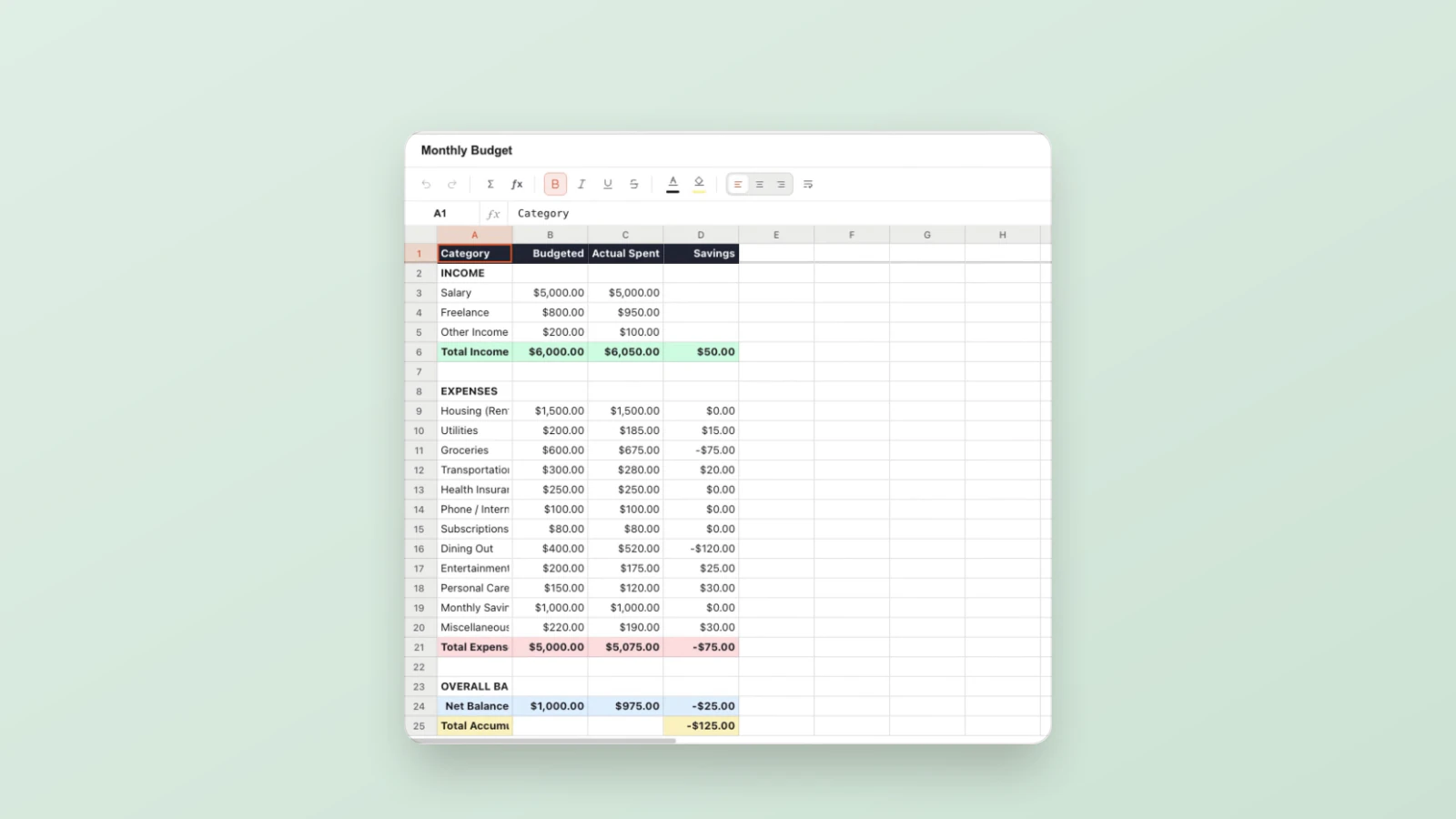
In Adral’s “Testing Adral” video, Adral is asked for a monthly budget template. It builds a Monthly Budget sheet with Income and Expenses sections and Budgeted and Actual Spent columns. In Adral’s own words, the totals for income, expenses and the net balance are “all computed with formulas so they update as you edit”, the amounts are formatted as currency and the sections are colour-coded.
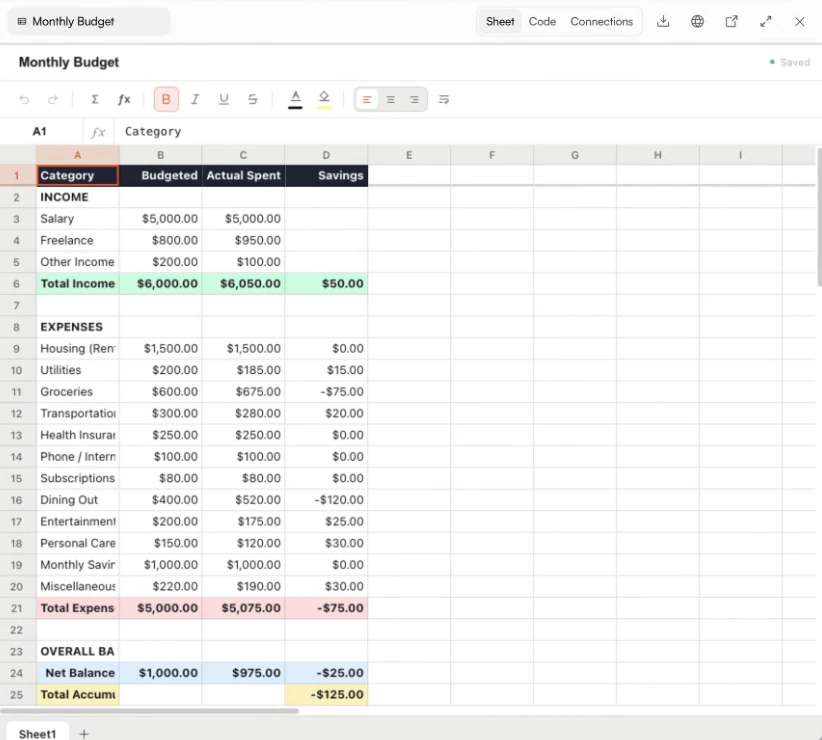
Then comes a follow-up in plain words: “Add a column for monthly savings to the budget, and calculate the total savings.” Adral adds the Savings column and the totals that go with it to the same sheet, without starting again.
How to make your own sheet with AI
- Choose Sheets and describe it. Say what each row is, which columns you need and what should total up. For example: “Make a monthly household budget in rupees with income and expense categories, budgeted and actual columns, and totals.”
- Attach your data if you have it. Add an Excel (.xlsx) file of up to 50 MB, or paste CSV data, and say what you want done with it.
- Check the draft. The new sheet waits for you to keep or discard the changes.
- Ask for changes in plain words: “add a savings column”, “sort by amount”, “add a chart of monthly spending”.
- Download it as an Excel (.xlsx) file, a PDF or an image.
What Adral’s sheets can do
- Real formulas: more than 100 functions across maths, statistics, logic, text, lookup and dates, with A1-style references and references across sheets.
- Rupees, properly: currency formatting in INR with lakh and crore grouping, or in US dollars.
- Charts: line, bar, column, area and pie, drawn from your cells and redrawn as they change.
- Filters and sorting, drop-down lists and colours by value.
- Frozen header rows and columns and multiple sheet tabs.
- CSV import of up to 50,000 rows.
- Formatting: number, percent, date and time formats, bold, colours, borders and alignment.
Another example: a startup budget with live totals
We also asked Adral for a first-quarter startup budget. It built a Q1 2026 Startup Budget with Salaries, Cloud Infrastructure, Marketing and Office & Operations for January to March, a monthly total and a quarter total. The selected cell shows the formula behind the grand total, =SUM(E6:E9), and Adral explained the set-up: “All totals are formulas, not typed numbers, so changing any yellow cell updates everything downstream.”
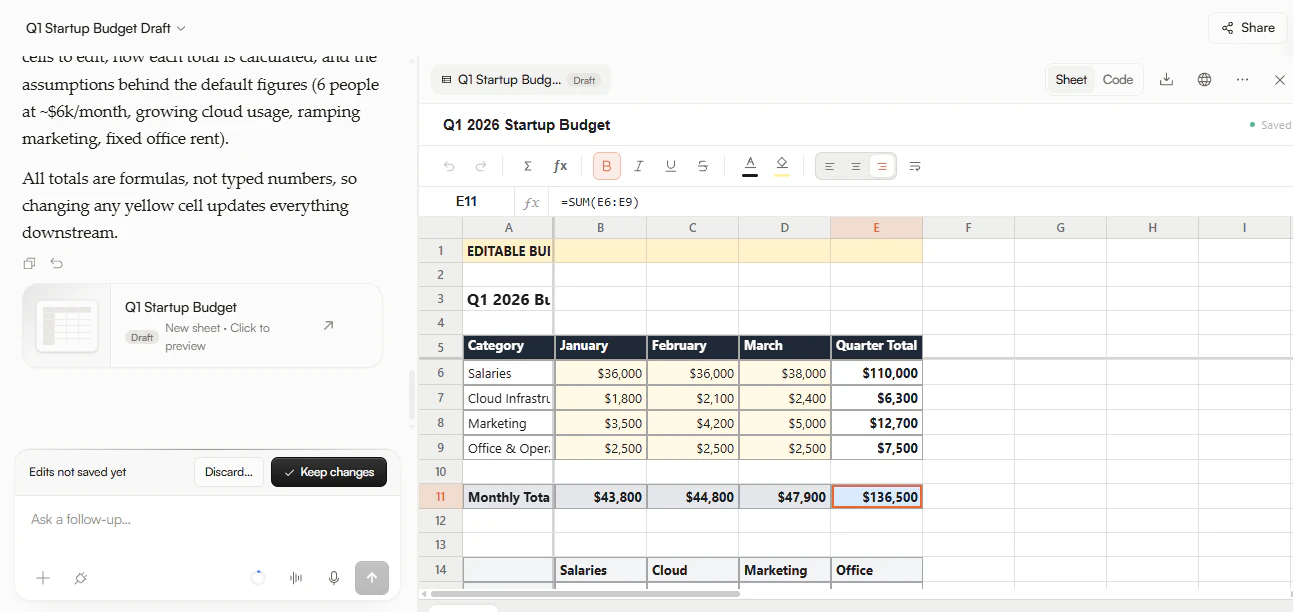
We gave Adral no figures, so it set sample ones and said what it had assumed: six people at about $6k a month, growing cloud usage, ramping marketing and fixed office rent. Swap in your own numbers and the totals follow.
Tips for a better AI spreadsheet
- Say what should add up. Then Adral writes formulas instead of typing numbers in.
- Ask for rupees (₹) if you want lakh and crore formatting.
- Ask for input cells in one colour, as in the startup budget, so everyone knows what to edit.
- Check a few totals by hand before you rely on the sheet. See Checking AI output before you accept it.
Frequently asked questions
Can AI make an Excel sheet for me?
Yes. Describe the sheet in Adral and it builds it with formulas. You can keep editing it and download it as an Excel (.xlsx) file.
Does it use real formulas?
Yes. Totals are formulas, for example =SUM(E6:E9), so they update when you change a number.
Can I use my existing Excel file?
Yes. Attach the .xlsx file (up to 50 MB), or paste CSV data, and say what you want done with it.
Can it show amounts in rupees?
Yes. Adral’s sheets format currency in INR with lakh and crore grouping.
Is it free to try?
Yes. Adral’s Free plan includes 30M tokens a month, with no card needed. See AI prices in India for all plans.
Related: How to make a presentation with AI · Writing a good brief · Checking AI output